Bài tập:
Tạo CSDL tên là AccountngSystem trong SQL server 2005/2008
Bài tập 1: hiểu cấu trúc database
- Thêm 1 bảng mới tên là ApplicationFunctions và thêm cột:
- ApplicationFuntionName nvarchar(50) not null
- CreatedBy varchar(50) default (user_name())
- CreatedDate smalldatetime default (getdate())
- Thêm 1 bảng mới tên là ApplicationSubFunctions và thêm cột:
- ApplicationSubFunctionName nvarchar(50) not null
- ApplicationFunctionName nvarchar(50), foreign key
- CreatedBy varchar(50) default (user_name())
- CreatedDate smalldatetime default (getdate())
- Thêm 1 bảng mới tên là ApplicationPermissions và thêm cột:
- ApplicationSubFunctionName nvarchar(50), Primary key
- Username nvarchar(50) not null,Primary Key
- Permission varchar(20) default is F
- CreatedBy varchar(50) default (user_name())
- CreatedDate smalldatetime default (getdate())
- ModifidBy varchar(50) default (user_name())
Bài tập 2: viết Store procedure cho dữ liệu ở 3 bảng trên
- Đối với bảng ApplicationFunctions:
- khai báo store procedure lấy ra tất cả các record và tên là
udsApplications
- khai báo store procedure lấy ra một record và tên là
udsApplicationFunctions;2 và tham số là ApplicationFunctionName.
- khai báo store procedure để insert 1 record với tên là
udsApplicationFunctions;3 và tham số là ApplicationSubFunctionName.
- khai báo store procedure để update 1 record với tên là udsApplicationFunctions;4 và tham số là ApplicationSubFunctionName
- khai báo store procedure để delete 1 record với tên là
udsApplicationFunctions;5 và tham số là ApplicationSubFunctionName
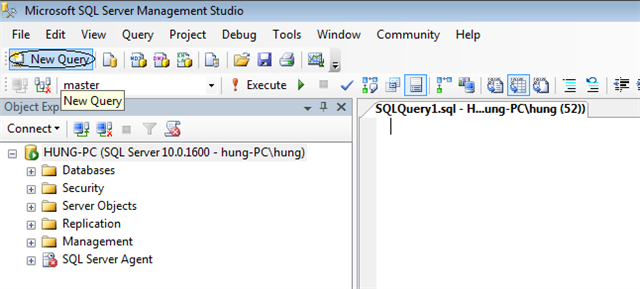
click New Query/chọn database AccountingSystem
create proc udsApplicationFunctions
as
begin
select * from ApplicationFunctions
end
//bôi đen 5 dòng trên/F5
create proc udsApplicationFunctions;2
@ApplicationFunctionName nvarchar(50)
as
begin
select * from ApplicationFunctions
where ApplicationFunctionName=@ApplicationFunctionName
end
//bôi đen những dòng trên/F5
create proc udsApplicationFunctions;3
@ApplicationFunctionName nvarchar(50)
as
begin
insert into ApplicationFunctions(ApplicationFunctionName)
values(@ApplicationFunctionName)
end
//bôi đen những dòng trên/F5
create proc udsApplicationFunctions;4
@ApplicationFunctionName nvarchar(50)
as
begin
update ApplicationFunctions
set ApplicationFunctionName=@ApplicationFunctionName
where ApplicationFunctionName=@ApplicationFunctionName
end
//bôi đen những dòng trên/F5
create proc udsApplicationFunctions;5
@ApplicationFunctionName nvarchar(50)
as
begin
delete from ApplicationFunctions
where ApplicationFunctionName=@ApplicationFunctionName
end
//bôi đen những dòng trên/F5
- Đối với bảng ApplicationSubFunctions:
- khai báo store procedure lấy ra tất cả các record và tên là
udsApplicationSubFunctions
- khai báo store procedure lấy ra một record và tên là
udsApplicationFunctions;2 và tham số là ApplicationSubFunctionName
- khai báo store procedure để insert 1 record với tên là
udsApplicationSubFunctions;3 và tham số là ApplicationSubFunctionName.
- khai báo store procedure để update 1 record với tên là
udsApplicationSubFunctions;4 và tham số là ApplicationSubFunctionName
- khai báo store procedure để Delete 1 record với tên là
udsApplicationSubFunctions;5 và tham số là ApplicationSubFunctionName
create proc udsApplicationSubFunctions
as
begin
select * from ApplicationSubFunctions
end
//bôi đen 5 dòng trên/F5
create proc udsApplicationSubFunctions;2
@ApplicationSubFunctionName nvarchar(50)
as
begin
select * from ApplicationSubFunctions
where ApplicationSubFunctionName=@ApplicationSubFunctionName
end
//bôi đen những dòng trên/F5
create proc udsApplicationSubFunctions;3
@ApplicationSubFunctionName nvarchar(50),
@ApplicationFunctionName nvarchar(50)
as
begin
insert into ApplicationSubFunctions(ApplicationSubFunctionName,ApplicationFunctionName)
values(@ApplicationSubFunctionName,@ApplicationFunctionName)
end
//bôi đen những dòng trên/F5
create proc udsApplicationSubFunctions;4
@ApplicationSubFunctionName nvarchar(50),
@ApplicationFunctionName nvarchar(50)
as
begin
update ApplicationSubFunctions
set ApplicationFunctionName=@ApplicationFunctionName
where ApplicationFunctionName=@ApplicationFunctionName
end
//bôi đen những dòng trên/F5
create proc udsApplicationSubFunctions;5
@ApplicationSubFunctionName nvarchar(50)
as
begin
delete from ApplicationSubFunctions
where ApplicationSubFunctionName=@ApplicationSubFunctionName
end
//bôi đen những dòng trên/F5
Bài tập 3: hiểu ApplicationSubFunction và ApplicationFunction store procedure và khai báo udsApplicationpermissions procedure cho bảng Applicationpermissions
create proc udsApplicationPermissions
as
begin
select * from ApplicationPermissons
end
//bôi đen 5 dòng trên/F5
create proc udsApplicationPermissions;2
@ApplicationSubFunctionName nvarchar(50),
@UserName nvarchar(50)
as
begin
select * from ApplicationPermissons
where ApplicationSubFunctionName=@ApplicationSubFunctionName
and UserName=@UserName
end
//bôi đen những dòng trên/F5
create proc udsApplicationPermissions;3
@ApplicationSubFunctionName nvarchar(50),
@UserName nvarchar(50)
as
begin
insert into ApplicationPermissons(ApplicationSubFunctionName,UserName)
values(@ApplicationSubFunctionName,@UserName)
end
//bôi đen những dòng trên/F5
create proc udsApplicationPermissions;4
@ApplicationSubFunctionName nvarchar(50),
@UserName nvarchar(50)
as
begin
update ApplicationPermissons
set ApplicationSubFunctionName=@ApplicationSubFunctionName,
UserName=@UserName
where ApplicationSubFunctionName=@ApplicationSubFunctionName and
UserName=@UserName
end
//bôi đen những dòng trên/F5
create proc udsApplicationPermissions;5
@ApplicationSubFunctionName nvarchar(50),
@UserName nvarchar(50)
as
begin
delete from ApplicationPermissons
where ApplicationSubFunctionName=@ApplicationSubFunctionName and
UserName=@UserName
End
//bôi đen những dòng trên/F5
Bài tập 4: more store procedure
- khai báo store procedure tên là udsGetUserRightForSubFuntion để nhận Sub funtion name sau đó lấy ra 1 trong 6 kí tự N, F, R, I , U, D bằng việc kiểm tra người dùng hiện tại (curent user) và SubFuntion name trong bảng Applicationpermissions
create proc udsGetUserRightForSubFunction
@ApplicationSubFunctionName nvarchar(50)
as
begin
select * from ApplicationPermissons
where ApplicationSubFunctionName=@ApplicationSubFunctionName and
UserName=user_name()
End
//bôi đen những dòng trên/F5
- khai báo store procedure name udsGetUserRightForFuntion để nhận funtion name sau đó trả về 0/1 bằng việc kiểm tra người dùng hiện hành và funtion name trong bảng Applicationpermissions và bảng ApplicationSubFunction
create proc udsGetUserRightForFunction
@ApplicationFunctionName varchar(50),
@Values int output
as
declare @Result int
begin
select @Result=count(*)
from ApplicationPermissons AP,ApplicationSubFunctions ASF
where AP.ApplicationSubFunctionName=ASF.ApplicationSubFunctionName
and ASF.ApplicationFunctionName=@ApplicationFunctionName
and UserName=user_name()
and Permisson!='N'
if(@Result>0)
begin
select @Values=1
print @Values
end
else
begin
select @Values=0
print @Values
end
end
//bôi đen những dòng trên/F5
Bài tập 5: chuẩn bị dữ liệu cho những bảng trên trong AccountingSystem database.
- Mở bảng ApplicationFunction và điền 5 chức năng là General Ledger, Account Receivable, Account Payable, Inventory Control và Fixed Access
- Mở bảng ApplicationSubFunction và điền 5 chức năng cho Account receivable là AR-Customers, AR-Quotation, AR-Order , AR-Sales Invoices vaf AR- Statistics
- Tạo tài Acount SQL mới tên là MyAccount
- Gán MyAcount tới AccountingSystem database
- Mở bảng Applicationpermissions và cho User MyAccount điền vào 5 chức năng là AR-Customers là N, AR-Quotation là F, AR-Orderv là I, AR-Sales Invoices là U và AR- Statistics là D
Bài tập 6: Hiểu làm thế nào để đưa dữ liệu vào những bảng trên
- Thêm Window Application tên là UserRightApplication
- Đổi tên form1 thành MainMenu form
- Thêm 1 form mới tên là Customer,thuộc tính Text là AR-Customers, sau đó tạo các nút view ,add, edit, update hoặc Delete
- Thêm 1 form mới tên là Orders thuộc tính Text là AR-Orders ,sau đó tạo các nút view ,add, edit, update hoặc Delete
- Thêm 1 form mới tên là Quotations thuộc tính Text là AR-Quotations, sau đó tạo các nút view ,add, edit, update hoặc Delete
- Thêm 1 form mới tên là Sales Invoices thuộc tính Text là AR-Sales Invoices, sau đó tạo các nút view , add, edit, update hoặc Delete
- Thêm 1 form mới tên là Statics thuộc tính Text AR-Statistics, sau đó tạo các nút view ,add, edit, update hoặc Delete
- Trở về MainMenu thêm MenuStrip sau khi định nghĩa menu là Account Receivable mà có 5 menu items để mở 5 form trên như là form con
Chú ý tất cả các form : button View đặt tên là btnView, btnAdd, btnEdit, btnUpdate, btnDelete phải giống nhau hết.thuộc tính Text của form là tên của SubFunctionsName tương ứng với từng chức năng trong database
Bài tập 7: Hiểu làm thế nào để áp dụng permission cho user
Khai báo tên method là GetUserRightForSubFuntion để truyền SubFuntionsName và kết nối đến database sau đó đó trả về N, F, R, I, U, D dựa trên những kí tự này bạn có thể disable hoặc enable view, add, edit, update, hoặc delete cho form
Trước khi viết ta tạo lớp DataProvider để viết Properties
using System;
using System.Collections.Generic;
using System.Linq;
using System.Text;
using System.Data;
namespace UserRightApplication
{
public class DataProvider
{
protected string commandText, serverName, databaseName, userName, password;
protected CommandType commandType;
public string CommandText
{
get { return commandText; }
set { commandText = value; }
}
public string ServerName
{
get { return serverName; }
set { serverName = value; }
}
public string DatabaseName
{
get { return databaseName; }
set { databaseName = value; }
}
public string UserName
{
get { return userName; }
set { userName = value; }
}
public string Password
{
get { return password; }
set { password = value; }
}
public CommandType CommandType
{
get { return commandType; }
set { commandType = value; }
}
}
}
Sau đó viết 1 Class nữa tên là TestPermission
Trong class TestPermission viết:
public string GetUserRightForSubFunction(string applicationSubFunctionName)
{
//alter proc udsGetUserRightForSubFunction
//@ApplicationSubFunctionName nvarchar(50)
//as
//begin
//select * from ApplicationPermissons
//where ApplicationSubFunctionName=@ApplicationSubFunctionName and
//UserName=user_name()
//end
//udsGetUserRightForSubFunction 'AR-Statistics'
string right = string.Empty;
//string connectionString = string.Format("server={0};database={1};uid={2};pwd={3}",
// serverName,databaseName,userName,password);
string connectionString = string.Format("server={0};database={1};uid={2};pwd={3}",
serverName, databaseName,userName,password);
SqlConnection sqlConnection = new SqlConnection(connectionString);
sqlConnection.Open();
SqlCommand sqlCommand = new SqlCommand(commandText, sqlConnection);
sqlCommand.CommandType = commandType;
sqlCommand.Parameters.AddWithValue("@ApplicationSubFunctionName", applicationSubFunctionName);
SqlDataReader reader = sqlCommand.ExecuteReader();
if (reader.Read())
{
right = Convert.ToString(reader["Permisson"]);
reader.Close();
}
sqlConnection.Close();
return right;
}
Bài tập 8: làm thế nào để quản lý sự cho phép chức năng?
Khai báo tên method là GetUserRightForFuntion để truyền tên của sub funtion và kết nối đến database sau đó trả về giá trị 0/1 dựa trên cơ sở đó bạn có thể disable hoặc enable menu để mở Customer, Quotations, Order, Sales Invoices và Statics form Customer, Quotations, Order, Sales Invoices, Statics,
Trong class TestPermission viết:
public int GetUserRightForFunction(string applicationFunctionName)
{
//string connectionString = string.Format("server={0};database={1};uid={2};pwd={3}",
// serverName,databaseName,userName,password);
string connectionString = string.Format("server={0};database={1};uid={2};pwd={3}",
serverName, databaseName,userName,password);
SqlConnection sqlConnection = new SqlConnection(connectionString);
sqlConnection.Open();
SqlCommand sqlCommand = new SqlCommand(commandText, sqlConnection);
sqlCommand.CommandType = commandType;
sqlCommand.Parameters.AddWithValue("@ApplicationFunctionName", applicationFunctionName);
SqlParameter sqlParametter = new SqlParameter();
sqlParametter.ParameterName = "@Values";
sqlParametter.SqlDbType = SqlDbType.Int;
sqlParametter.Direction = ParameterDirection.Output;
sqlCommand.Parameters.Add(sqlParametter);
sqlCommand.ExecuteNonQuery();
sqlConnection.Close();
int i = (int)sqlCommand.Parameters["@Values"].Value;
return i;
//alter proc udsGetUserRightForFunction
//@ApplicationFunctionName varchar(50),
//@Values int output
//as
// declare @Result int
//begin
// select @Result=count(*)
// from ApplicationPermissons AP,ApplicationSubFunctions ASF
// where AP.ApplicationSubFunctionName=ASF.ApplicationSubFunctionName
// and ASF.ApplicationFunctionName=@ApplicationFunctionName
// and UserName=user_name()
// and Permission!='N'
// if(@Result>0)
// begin
// select @Values=1
// print @Values
// end
// else
// begin
// select @Values=0
// print @Values
// end
//end
//declare @soluong int
//exec udsGetUserRightForFunction 'Account Receivable',@soluong output
//print @soluong
}
Bài tập 9: cách gọi các method vào Form
ẩn hiện Function(menu chính)
private void MainMenu_Load(object sender, EventArgs e)
{
TestPermission testPermission = new TestPermission();
//Gọi Store Procedure
testPermission.CommandText = "udsGetUserRightForFunction";
testPermission.CommandType = CommandType.StoredProcedure;
testPermission.ServerName = "(local)";
testPermission.DatabaseName = "AccoutingSystem";
testPermission.UserName = "MyAccount";
testPermission.Password = "123456";
int j = 0;
string[] arrayFunction = new string[] { "Account Receivable", "Account Payable" };
object[] arrayFunctionControl = { accountReceivaleToolStripMenuItem, accountPayableToolStripMenuItem };
for (int i = 0; i < arrayFunction.Length; i++)
{
j = testPermission.GetUserRightForFunction(arrayFunction[i]);
if (j == 0)
{
((ToolStripMenuItem)arrayFunctionControl[i]).Enabled = false;
}
//else
//{
// string[] arraySubFunction = new string[] { "AR-Customers", "AR-Orders", "AR-Quotations", "AR-Sales Invoices", "AR-statistics" };
// object[] arraySubFunctionControl ={aRCustomersToolStripMenuItem,aROrdersToolStripMenuItem,aRQuotationsToolStripMenuItem,
// aRSalesInvoicesToolStripMenuItem,aRStatisticsToolStripMenuItem};
// TestSubFunctions(arraySubFunction, arraySubFunctionControl);
//}
}
}
Ẩn Hiện các SubFuntion:Thêm method TestSubFunctions và gọi trong điều kiện else của FormLoad
private void MainMenu_Load(object sender, EventArgs e)
{
TestPermission testPermission = new TestPermission();
//Gọi Store Procedure
testPermission.CommandText = "udsGetUserRightForFunction";
testPermission.CommandType = CommandType.StoredProcedure;
testPermission.ServerName = "(local)";
testPermission.DatabaseName = "AccoutingSystem";
testPermission.UserName = "MyAccount";
testPermission.Password = "123456";
int j = 0;
string[] arrayFunction = new string[] { "Account Receivable", "Account Payable" };
object[] arrayFunctionControl = { accountReceivaleToolStripMenuItem, accountPayableToolStripMenuItem };
for (int i = 0; i < arrayFunction.Length; i++)
{
j = testPermission.GetUserRightForFunction(arrayFunction[i]);
if (j == 0)
{
((ToolStripMenuItem)arrayFunctionControl[i]).Enabled = false;
}
else
{
string[] arraySubFunction = new string[] { "AR-Customers", "AR-Orders", "AR-Quotations", "AR-Sales Invoices","AR-statistics" };
object[] arraySubFunctionControl ={aRCustomersToolStripMenuItem,aROrdersToolStripMenuItem,aRQuotationsToolStripMenuItem,
aRSalesInvoicesToolStripMenuItem,aRStatisticsToolStripMenuItem};
TestSubFunctions(arraySubFunction, arraySubFunctionControl);
}
}
}
private void TestSubFunctions(string[] arraySubFunction, object[] arrayControl)
{
TestPermission testPermission = new TestPermission();
//Gọi Store Procedure
testPermission.CommandText = "udsGetUserRightForSubFunction";
testPermission.CommandType = CommandType.StoredProcedure;
testPermission.ServerName = "(local)";
testPermission.DatabaseName = "AccoutingSystem";
testPermission.UserName = "MyAccount";
testPermission.Password = "123456";
string right = "";
for (int i = 0; i < arraySubFunction.Length; i++)
{
right = testPermission.GetUserRightForSubFunction(arraySubFunction[i]);
switch (right)
{
case "N":
((ToolStripMenuItem)arrayControl[i]).Enabled = false;
break;
}
}
}
Bài tập 10: cách gọi các method đến các Form chi tiết
Trước khi viết xây dựng 1 lớp dùng chung cho các Form UseRight.cs
using System;
using System.Collections.Generic;
using System.Linq;
using System.Text;
using System.Windows.Forms;
using System.Data;
namespace UserRightApplication
{
internal class UseRight
{
internal void Right(Button btnView, Button btnAdd, Button btnEdit, Button btnUpdate, Button btnDelete,stringsubFunctionsName)
{
TestPermission testPermission = new TestPermission();
testPermission.ServerName = "(local)";
testPermission.DatabaseName = "AccoutingSystem";
testPermission.UserName = "MyAccount";
testPermission.Password = "123456";
//Gọi Store Procedure
testPermission.CommandText = "udsGetUserRightForSubFunction";
testPermission.CommandType = CommandType.StoredProcedure;
string right = "";
right = testPermission.GetUserRightForSubFunction(subFunctionsName);
switch (right)
{
case "N":
btnView.Enabled = btnAdd.Enabled = btnEdit.Enabled =
btnUpdate.Enabled = btnDelete.Enabled = false;
break;
case "I":
btnView.Enabled = true;
btnAdd.Enabled = true;
btnEdit.Enabled = btnUpdate.Enabled = btnDelete.Enabled = false;
break;
case "F":
break;
case "U":
btnView.Enabled = true;
btnAdd.Enabled = btnDelete.Enabled = false;
break;
case "D":
btnView.Enabled = true;
btnAdd.Enabled = btnEdit.Enabled = btnUpdate.Enabled = false;
break;
}
}
}
}
Trong mỗi Form chi tiết ở FormLoad ta gọi đến Method :
private void APCustomers_Load(object sender, EventArgs e)
{
UseRight useRight = new UseRight();
useRight.Right(btnView, btnAdd, btnEdit, btnUpdate, btnDelete, this.Text);
}
Bài tập 11: how to manage tow rights on one sub funtion for one user?
Bài tập 12: how to synchronize permission from application to database?
|